Invite-only beta · Windows 10/11
TS Splice
Move task sequence steps between ConfigMgr environments.
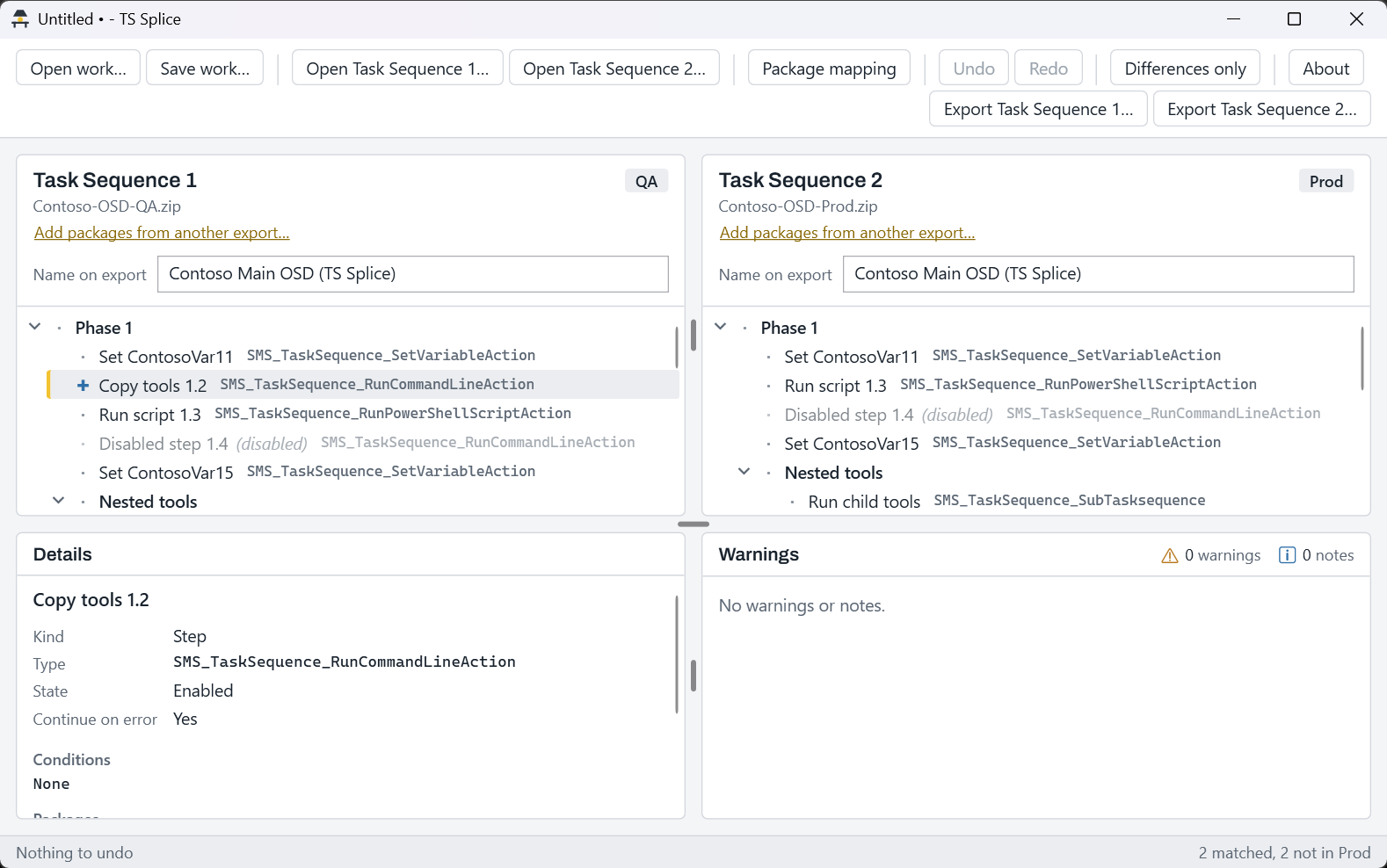
TS Splice moves steps between two exported ConfigMgr task sequences, for example promoting this release's changes from QA to Prod. It translates package IDs and writes a verified export you import in the console.
Free during the beta, with limited spots. In your email, include your role, roughly how many task sequences and environments you maintain, and your Windows version.
Beta builds are personal (licensed to you), expire on the date shown in the app, and are one per person.
The problem
Every release, you build it twice
You change and test steps in the QA task sequence. Then you rebuild the same steps by hand in Prod. The package IDs are different in each environment, so nothing can be copied as is. One missed reference, and builds break.
TS Splice does the copying and the translating, then checks its own work.
How it works
Export, splice, check, import
01Export both task sequences
In the ConfigMgr console, export the source and the target task sequence. Include dependencies; leave content out.
02Open them side by side
Markers show what's different: ✚ only here, ✎ differs, · same, ★ copied.
03Move the steps
Drag or copy steps and groups across. Package IDs are translated by matching package names between the two environments.
04Review the warnings
Unmatched packages, variables that nothing sets and child task sequences are flagged before you export.
05Export and verify
TS Splice writes a new zip, reads it back and checks it. Only then does it call the export ready.
06Import in the console
Import the zip with the normal ConfigMgr import wizard.
Features
Built for the promotion you do every release
Side-by-side compare
Both task sequences in one window, with a differences-only filter to hide what already matches.
Edit the way you expect
Drag and drop, copy and paste, multi-select, undo and redo.
Package mapping
Packages are paired by name between environments. Pairs you set by hand are remembered.
Add packages from another export
If a package isn't referenced in the target export yet, pull its details in from another export.
Save your work
Save a session and pick it up later. Autosave covers you if the window closes.
Verified export
Every file you didn't touch stays byte-identical. Reference lists are checked for consistency. An export that fails a check is kept as
-FAILED-CHECK.zip, never as the real thing.Works both directions
QA to Prod, or Prod back to QA. Either side can be the source.
Safety and privacy
It only touches the files you give it
TS Splice works fully offline. It never connects to a site server and never changes anything in Configuration Manager. You stay in control of the import.
- Never overwrites the files you opened. Exports are always new files.
- No telemetry and no account.
- Refuses oversized or malformed zip files.
- Never opens a network path from saved work without asking you first.
System requirements
What you need
- Operating system
- Windows 10 (version 1809 or later) or Windows 11, x64
- Install
- A single exe. No installer, no admin rights.
- Input
- Task sequence exports from Configuration Manager current branch
- Network
- None
Beta access
Free during the beta
Invite only
Spots are limited. Email support@lampbench.com with:
- your role,
- roughly how many task sequences and environments you maintain,
- your Windows version.
Beta builds are licensed to you personally and stop working when they expire. One per person.
Questions
Good to know
- Does it need access to my site?
- No. It works only on the exported zip files on your PC. It never connects to a site server or the console.
- What does the export contain?
- A standard task sequence export zip, the same kind the console produces. It holds the target task sequence with your changes and the package references it needs. Files you didn't change are copied byte for byte.
- Does it handle applications?
- Install Application steps are copied, but application references aren't translated yet. A warning flags each one so you can fix it after import.
- What will it cost?
- It's free during the beta. A paid version, licensed per engineer, is planned.
- Can I import over my existing task sequence?
- The safest way: copy the target task sequence in the console first, export the copy, and overwrite only that copy when you import. Never overwrite a task sequence someone else owns.
TS Splice is an independent tool. It is not affiliated with, endorsed by or sponsored by Microsoft. Microsoft, Configuration Manager and Windows are trademarks of the Microsoft group of companies. Always review an export and test it before production use. Use is subject to the TS Splice license agreement.