Free public beta · Windows 10/11
LogMedic
Offline log diagnosis for MECM, Intune and Windows admins.
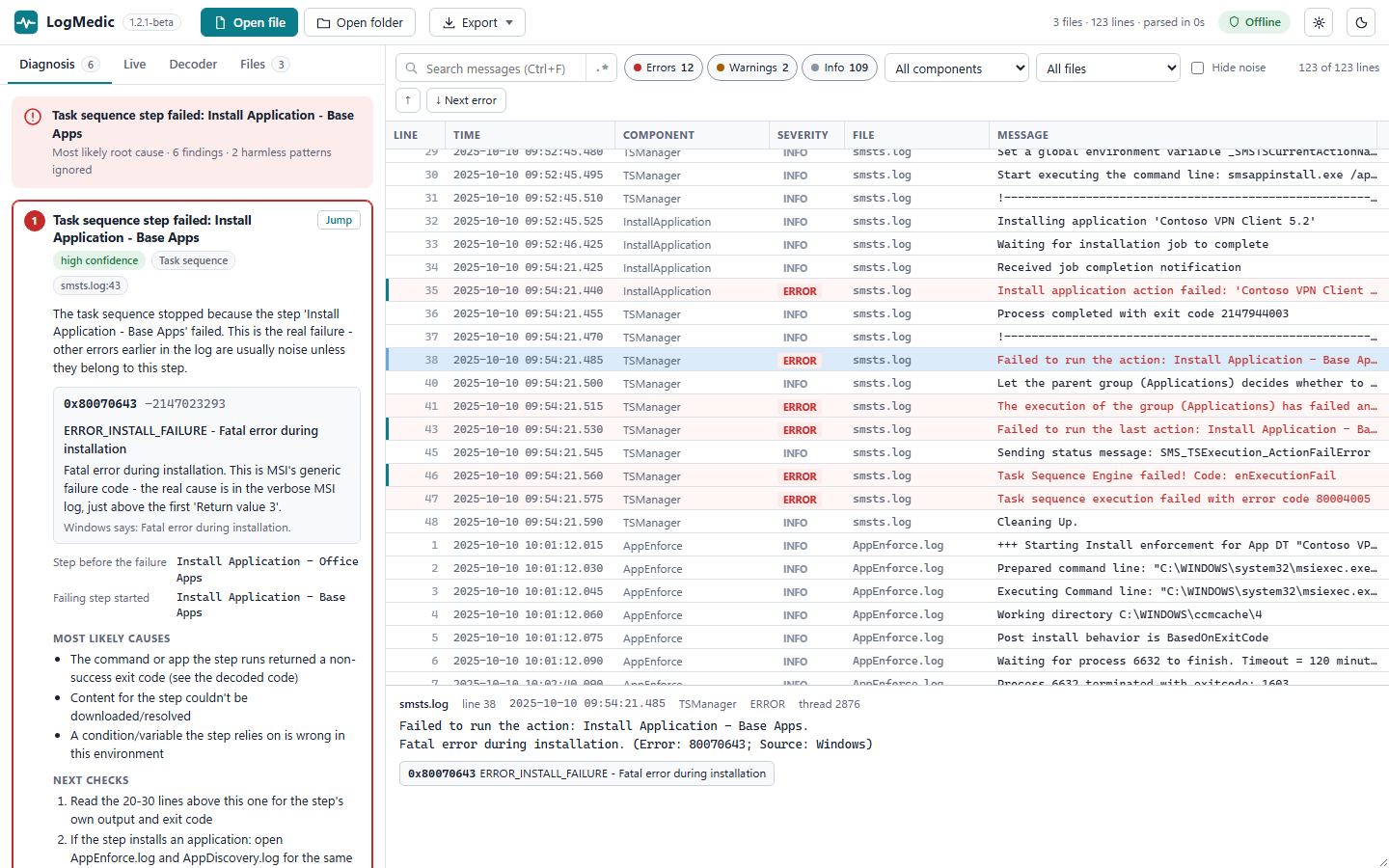
Open a log file, a folder of logs or a live watch list. LogMedic finds the real failure, labels the noise, and tells you what to check next. Everything runs on your PC; your logs never leave it.
Version 1.2.1-beta · per-user installer, no admin rights · free during beta
Screenshots
What it does
From a wall of log lines to a short list of findings
01A fast log viewer
A CMTrace-style table with severity colours, text or regex search, and filters for severity, component and file. Open a folder and you get one timeline from all its logs, sorted by time. A 20 MB log opens in about a second.
02Diagnosis with rule packs
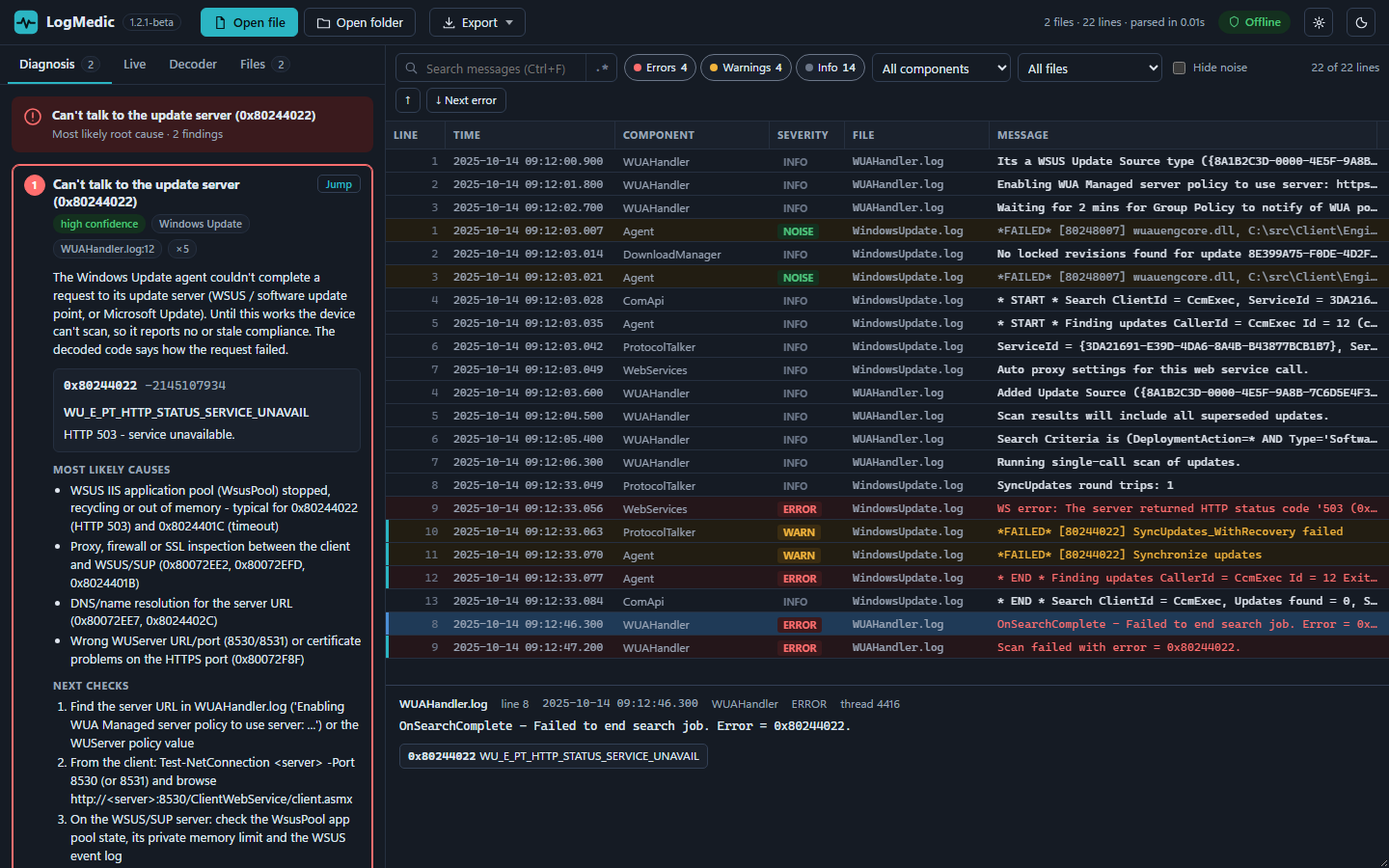
Product-specific rules for ConfigMgr, Intune, Windows Update and upgrades find the failing task sequence step, decode exit codes and flag known-harmless noise so you don't chase it.
03A generic engine for everything else
For logs nobody wrote rules for: exceptions and stack traces grouped by type, error bursts, the first error after normal operation, repeated error signatures and non-zero exit codes. These findings are marked generic and scored with lower confidence.
04Live monitor
Build a saved watch list of local or UNC paths (for example
\\PC\C$\Windows\CCM\Logs). New lines stream in and are diagnosed as they arrive, with in-app alerts and optional Windows notifications. Rotation, new files and locked files are handled.05Error code decoder
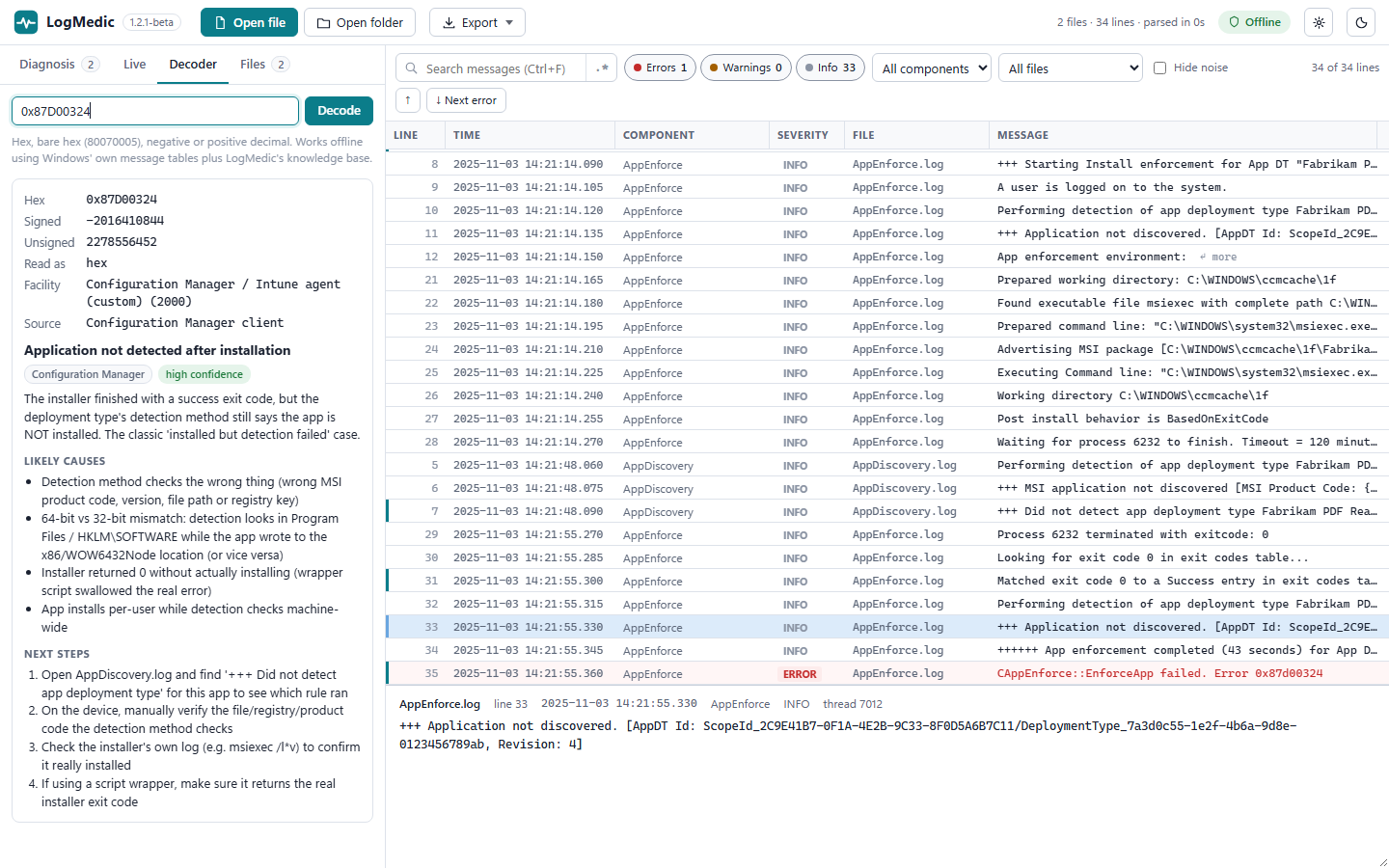
Paste a code in hex, bare hex or decimal. LogMedic decodes it offline using Windows' own message tables and a curated knowledge base of about 270 entries.
06Reports you can hand over
Export findings and key lines as an HTML or Markdown report, or copy Markdown straight to the clipboard for a ticket.
Supported logs
Built for MECM, Intune and Windows. Works on any log.
Formats it detects automatically
- CMTrace & SMS logs
- Verbose MSI logs
- WindowsUpdate.log
- Panther
- CBS
- DISM
- SetupDiag XML
- Event logs (.evtx)
- JSON lines
- Syslog (RFC 3164/5424)
- W3C / IIS
- Apache / nginx
- CSV with header
- key=value (logfmt)
- Plain text
Multi-line messages and rollover files (smsts-YYYYMMDD-HHMMSS.log, .lo_) are picked up automatically. Windows Update .etl traces can be converted with Windows' built-in Get-WindowsUpdateLog, only after LogMedic asks you.
What the rule packs know
- ConfigMgr / Intune
- Failing task sequence steps, harmless smsts noise, app exit codes, "installed but detection failed", IME timeouts and download failures, ccmsetup and client.msi failures.
- Windows Update
- WSUS/SUP connectivity, scan failures and policy conflicts, download/BITS and install failures, pending reboots, maintenance windows.
- Upgrade & servicing
- SetupDiag profiles, 0xC1900101 rollbacks with the phase decoded, compatibility hard blocks, disk space, CBS store corruption, DISM source errors, USMT return codes.
- Example pack
- nginx: refused or timed-out backends, no live upstreams, port in use, config errors, HTTP 5xx.
Privacy
Your logs never leave your PC
LogMedic never sends your logs anywhere. It makes no network connections unless you turn on update checks, which download a small version file and send nothing about you, your PC or your logs.
- No telemetry, no account and no cloud AI. Logs are read and analysed only on your PC.
- Update checks are off by default. The first run asks once, with the box unchecked.
- An update check is a single HTTPS request for a static file: no query string, no cookies, no identifiers.
- Updates are installed only if the download's size, SHA-256 hash and code signature all check out.
- It only starts built-in Windows tools (
wevtutil,Get-WindowsUpdateLogafter you agree, and PowerShell for notifications and installing a verified update). - Settings and converted logs stay in
%APPDATA%\LogMedic.
System requirements
What you need
- Operating system
- Windows 10 or Windows 11, 64-bit
- Runtime
- Microsoft Edge WebView2 runtime (already included in Windows 11)
- Permissions
- No admin rights needed. Installs per user to
%LOCALAPPDATA%\Programs\LogMedicwith a Start-menu shortcut and an uninstaller. - Network
- None required. Optional update checks need HTTPS access.
Pricing
Free during beta; Pro planned
Free
LogMedic is free for the length of the public beta. A paid Pro edition is planned for later. Details will be posted on this page before it launches.
Beta feedback
Tell us what it got wrong
The beta gets better with every log it misreads. Email [email protected] with:
- your LogMedic version and Windows version,
- the kind of log (for example
smsts.log,IntuneManagementExtension.log,CBS.log), - what LogMedic said, and what the real cause turned out to be.
Please don't send logs that contain sensitive data. If a sample would help, send only the lines around the problem and replace user names, host names, IP addresses and paths first.
LogMedic is an independent tool. It is not affiliated with, endorsed by or sponsored by Microsoft. Microsoft, Configuration Manager, Intune and Windows are trademarks of the Microsoft group of companies. nginx is a trademark of F5, Inc. LogMedic's explanations are guidance: check them against your environment before you make changes. Use is subject to the LogMedic licence agreement.